
How to Check Driving Licence Status via Sarathi Parivahan Portal
The Sarathi Parivahan portal (sarathi.parivahan.gov.in) is India’s official government platform for all driving licence services, maintained by the Ministry of Road Transport and Highways (MoRTH). Here is how to check your DL status step by step.
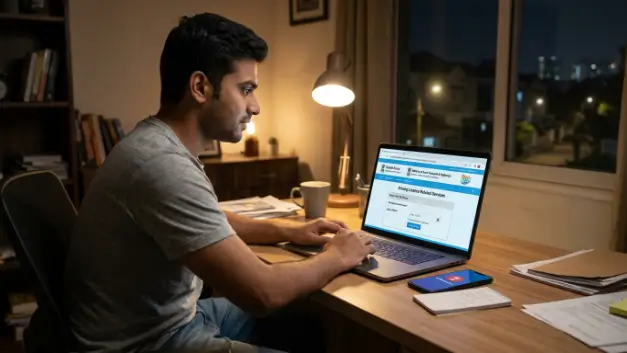
Step 1: Visit the Sarathi Portal
Open your browser and navigate to sarathi.parivahan.gov.in, or go directly to m-parivahan.co/driving-licence-status/ for a guided experience. The portal is available 24 hours a day, seven days a week.
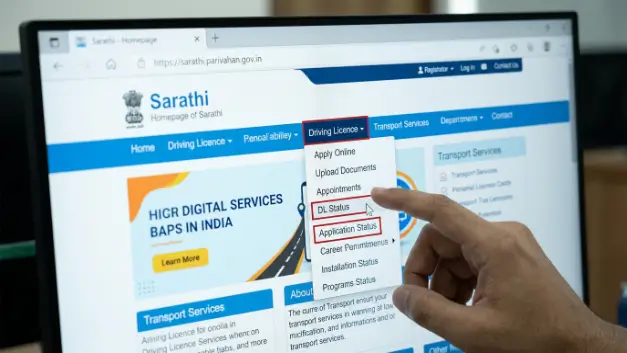
Step 2: Select DL Status from the Menu
On the Sarathi homepage, click on ‘Driving Licence’ in the top navigation menu. From the dropdown, select ‘DL Status’ or ‘Application Status’. This will open the DL verification page.
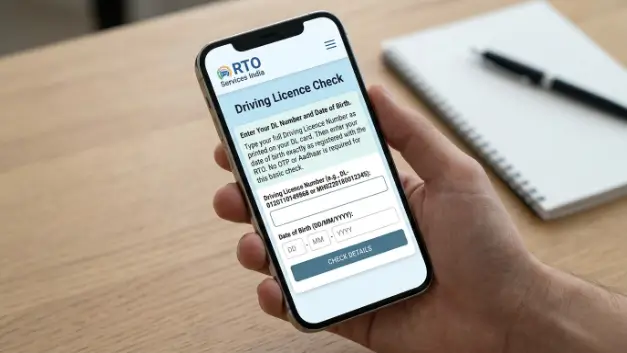
Step 3: Enter Your DL Number and Date of Birth
Type your full Driving Licence Number as printed on your DL card. The format typically looks like: DL-0120110149868 or MH0220180012345, depending on your state. Then enter your date of birth exactly as registered with the RTO. No OTP or Aadhaar is required for this basic check.
How to Check DL Status via mParivahan App
For smartphone users, the mParivahan app offers a faster and more visual way to check DL status online India. After installing the app and registering with your mobile number, add your driving licence by entering the DL number and date of birth. Your DL details, including status and validity, will appear on your personal dashboard within minutes. The app also gives you a virtual DL — a digital version of your licence that is legally valid and accepted by traffic police across India.
Hindi Note: mParivahan app mein DL add karne ke baad virtual DL mil jata hai jo traffic police bhi accept karte hain — physical card zaroori nahi.
What Different DL Status Labels Mean
When you run a driving licence status check, you may see one of several status labels. Understanding what each one means is important so you can take the right action.
Active / Valid
This is the ideal status. It means your driving licence is current, valid, and you are legally permitted to drive the classes of vehicles listed on your DL. No action is needed unless your expiry date is approaching within the next three months.
Expired
Your driving licence has crossed its validity date. You must renew it immediately — driving with an expired DL is a violation. The good news is that you can apply for DL renewal online through the Sarathi portal. There is a grace period of 30 days after expiry in most states, but do not rely on it.
Suspended
Your licence has been temporarily suspended due to a serious traffic violation or court order. You cannot legally drive during the suspension period. To get your licence reinstated, you may need to appear before the concerned RTO or court.
Revoked
This is a permanent cancellation of your driving licence. It typically happens after repeated serious offences. You will need to apply for a fresh DL from scratch, subject to any court restrictions.
Applied / Under Process
Your DL application has been submitted but has not yet been processed by the RTO. This status is common for new DL applicants or those who have recently applied for renewal. Check back after 7–10 working days.
How to Renew an Expired Driving Licence Online
If your DL status shows ‘Expired’, here is how to renew it online through the Sarathi Parivahan portal without visiting the RTO in person (available in most states).
Log in to sarathi.parivahan.gov.in using your registered mobile number. Go to ‘Apply Online’ and select ‘Renewal of Driving Licence’. Fill in Form 9, the renewal application form, and upload the required documents: a recent passport-size photo, proof of address, and a medical certificate (Form 1A) if you are above 40 years of age. Pay the renewal fee online, which typically ranges from ₹200 to ₹400 depending on your state and the class of vehicle.
After payment, your application is submitted. In most states, no physical visit to the RTO is required unless the system flags your application for document verification. The renewed smart card DL is sent to your registered address via Speed Post within 7 to 15 working days.
Hindi Note: DL renewal ke liye Sarathi portal par ‘Apply Online’ select karein. Fee ₹200-400 hai aur renewal smart card ghar par Speed Post se aata hai.
Frequently Asked Questions
Visit sarathi.parivahan.gov.in or m-parivahan.co and enter your DL number along with your date of birth. The real-time status is displayed instantly no RTO visit or login is required.
Yes, the DL status check on Sarathi Parivahan is publicly accessible. You can check any person’s DL status by entering their DL number and date of birth. This is useful for employers verifying driver credentials or individuals buying a used vehicle.
You need a passport-size photo, proof of address (Aadhaar, Voter ID, or utility bill), your existing DL number, and a medical certificate (Form 1A) if you are above 40 years of age or applying for a heavy transport vehicle licence.
Yes. As per a Ministry of Road Transport and Highways (MoRTH) notification, the virtual driving licence stored on the mParivahan app is a legally valid document and is accepted by traffic police across all states in India.
After successful online payment and document submission, the renewed DL smart card is typically dispatched within 7 to 15 working days through Speed Post to your registered address. You can track the delivery status using the consignment number sent via SMS.
Conclusion
A driving licence status check takes less than a minute online but can save you from significant legal trouble. Use the Sarathi Parivahan portal or mParivahan app to verify your DL validity, understand your current status, and initiate renewal if needed — all from your phone or computer. Keep your DL active and updated at all times. Visit m-parivahan.co/driving-licence-status/ for the most current step-by-step guidance on DL status check online India.