
eChallan Check Online: How to Check & Pay Traffic Challan by Vehicle Number
If you have ever received a traffic violation notice or are unsure whether your vehicle has any pending fines, learning how to do an eChallan check online can save you from serious legal trouble. The Indian government has digitised the entire traffic challan system through the mParivahan, making it possible to check and pay any outstanding challans in just a
few minutes from the comfort of your home. Whether you want to check by vehicle number, driving licence number, or challan number, this complete guide covers everything you need to know.
What is an eChallan and Why Should You Check It?
An eChallan (electronic challan) is a digital traffic penalty issued by traffic police when a vehicle violates road rules. Unlike a physical challan that is handed over on the spot, an eChallan is often generated automatically through CCTV cameras, speed guns, or by a traffic officer using a handheld device. The fine details are directly linked to your vehicle registration number in the government database.
If you ignore a pending eChallan, your vehicle’s RC (Registration Certificate) renewal can be blocked, or your driving licence may get flagged at the RTO. This is why it is important to regularly check your e challan status online, especially if you drive frequently in metro cities where CCTV-based enforcement is active.
Hindi Note: Agar aapko pata nahi ki challan mila hai ya nahi, toh gaadi ka number daal kar turant check kar sakte hain Parivahan portal par.
How to Check eChallan Status Online via Parivahan Portal
The official platform for eChallan in India is the Parivahan Sewa portal, accessible at echallan.parivahan.gov.in. Follow the steps below to check your traffic challan check by vehicle number quickly and accurately.
Step 1: Open the eChallan Portal
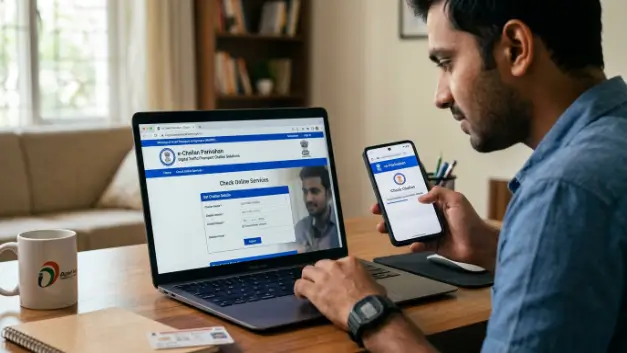
Visit echallan.parivahan.gov.in or go directly to m-parivahan.co/echallan-check/. The portal is mobile-friendly and works on any browser without needing to download anything.
Step 2: Select Search Option
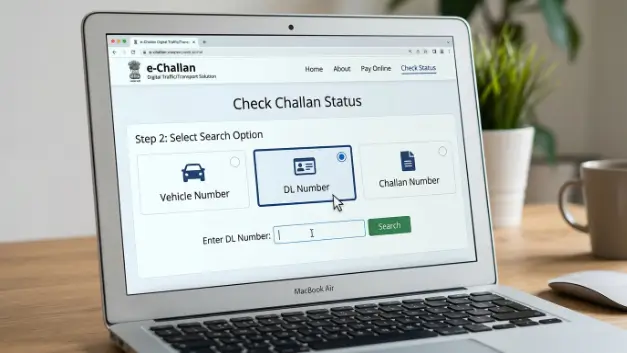
On the homepage, click on ‘Check Challan Status’. You will see three options to search: by Vehicle Number, by DL Number, or by Challan Number. Select whichever option is most convenient for you.
Step 3: Enter Your Details
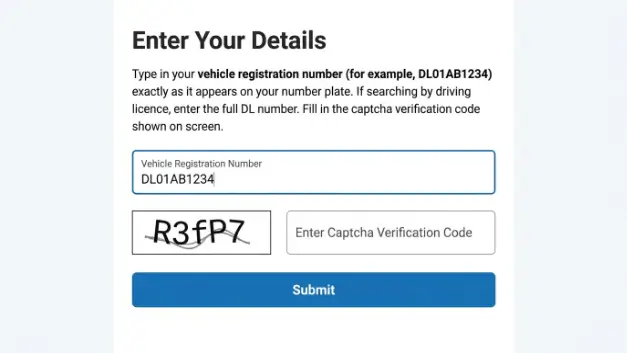
Type in your vehicle registration number (for example, DL01AB1234) exactly as it appears on your number plate. If searching by driving licence, enter the full DL number. Fill in the captcha verification code shown on screen.
Hindi Note: Vehicle number mein koi bhi space ya special character mat daalen. Sirf letters aur numbers use karein jaise: MH02AB1234.
How to Pay eChallan Online UPI, Card, and Net Banking
Once you find a pending challan in your e-challan check results, paying it online takes under two minutes. Next to each unpaid challan, you will see a ‘Pay Now’ button. Click it and select your preferred payment method. UPI apps like Google Pay, PhonePe, or Paytm are the fastest options. You can also pay using a debit card, credit card, or internet banking.
After successful payment, the portal generates a payment receipt immediately. Download this receipt or take a screenshot — it serves as legal proof that the challan has been cleared. You will also receive a confirmation SMS on your registered mobile number within a few minutes.
What Details Do You Need to Check eChallan?
To complete a parivahan echallan check, you only need one of the following identifiers: your vehicle registration number (number plate), your driving licence number, or the challan number if it was issued physically. You do not need Aadhaar or any login credentials to check the basic challan status. The search is open and instant.
Make sure your vehicle number is entered in the correct format. Indian number plates follow the pattern: State Code (2 letters) + RTO District Code (2 digits) + Series (1-2 letters) + Unique Number (4 digits). For example: UP32AB5678.
How to Dispute a Wrong eChallan
It is not uncommon for an eChallan to be issued with incorrect details — wrong vehicle number due to CCTV misread, wrong violation type, or even a challan issued to a vehicle that was stolen. If you believe your challan is incorrect, the government provides a formal objection process.
Visit the eChallan portal, locate the disputed challan, and click the ‘Objection’ or ‘Appeal’ option. You will be asked to state your reason for the dispute and upload supporting documents such as a copy of your RC, a police report (in case of theft), or a photo showing the actual situation. Traffic police will review your objection, usually within a few working days, and you will be notified of the decision via SMS or on the portal.
Hindi Note: Galat challan ke liye ‘Objection’ option ka use karein aur apni RC copy ya relevant document upload karein. Review mein 7-10 din lag sakte hain.
eChallan Check via the mParivahan App
If you prefer checking challans on your smartphone, the mParivahan app (developed by NIC eGov) offers a seamless way to monitor your E-Challan Parivahan status on the go. After downloading the app from Google Play Store or Apple App Store, register with your mobile number and add your vehicle RC to your dashboard. The app will automatically show any pending challans linked to your vehicle and even allow you to pay them directly through the app interface.
The mParivahan app is particularly useful because it also stores your virtual driving licence and RC — both of which are legally accepted by traffic police nationwide.
Frequently Asked Questions about eChallan Check
Go to echallan.parivahan.gov.in or m-parivahan. Click ‘Check Challan Status’, select ‘Vehicle Number’, enter your number plate, fill in the captcha, and click Get Details. All pending challans linked to your vehicle will be displayed instantly.
No. eChallan payment is a one-time full payment. You cannot split the fine into instalments. However, if you have multiple challans, each one can be paid separately at different times.
Ignoring an eChallan for over 60 days can lead to serious consequences. Your vehicle RC renewal may be blocked at the RTO, and your driving licence could be flagged as non-compliant. In severe cases, a court notice may be issued against you.
Yes, the official echallan parivahan gov in website uses secure HTTPS encryption and government-grade security. Avoid paying through unofficial websites or WhatsApp links that claim to offer challan payment services — these are often scams.
Database updates on the Parivahan portal can take 24 to 48 hours after payment. Always keep your payment receipt. If the status does not update after 48 hours, contact the concerned traffic police station with your receipt number.
Conclusion
Doing an eChallan check online is one of the simplest yet most important habits for every Indian vehicle owner. The Parivahan eChallan portal and the mParivahan app give you full visibility into your traffic challan history along with instant payment options via UPI, card, or net banking. Never ignore a pending challan. Check your e challan status online regularly, pay on time, and stay penalty-free on Indian roads. Bookmark or quick access whenever you need it.